Friday, June 24, 2016

CURRENCY CONCEPTS IN ORACLE FUSION APPLICATIONS GENERAL LEDGER

This training article will helps to understand various Currency Concepts available in Fusion Applications. The concept is not too different from Oracle E-Business suite. 
Let’s first discuss why we need currency in Oracle Applications-
Currency is one of the “C” while defining Ledger and each Ledger has a ‘Functional Currency’, which is the prime reporting currency for the group of organizations. For every transaction, Oracle stores the amount in Entered Currency (currency of the transaction) and Functional Currency (the equivalent in the Functional Currency of the Ledger).Currency is always associated with Ledger even if its Primary Ledger or Secondary Ledger. 
Account balances can be maintained in Foreign Currencies as well in Functional Currencies. Foreign Currency balances represents the total journals in that particular Foreign (Entered) Currency, whereas the Functional Currency balances represents the sum of journals in all currencies, using the Functional Currency equivalent. So, when a Foreign Currency journal is posted, this helps to update two balances; one for Foreign Currency and one for Functional Currency.
When Foreign Currency transactions in Fusion Accounts Payable or Fusion Account Receivables are transferred to Oracle Fusion General Ledger (transferred from a sub-ledger module to GL) they are created as journals in GL. These journals are in the Entered Currency of the transaction, with the Functional Currency equivalent stored against each line (debit or credit).

There are 3 different currency processes that are performed in Oracle Fusion Applications and these are-
  • Conversion
  • Revaluation
  • Translation

In order to discuss Translation, Revaluation and Conversion, Let’s also understand different currency terms in Oracle Fusion Applications.
Functional Currency-Functional currency refers to the currency in which a Ledger in Oracle is denominated.
Foreign Currency-Any currency other than the functional currency of a Ledger. This is also known as the transaction currency or entered currency.
Cross-Currency Payments-Cross-currency payments are payments made from a bank account in a currency other than the primary currency in which the bank account is denominated.

Conversion
This refers to cross currency transactions that are converted during the accounting transformation to the currency of the ledger in which the transaction takes place. The process includes defining conversion rate types in the Currency Rates Manager Page in the Manage Daily Rates tasks. Then Conversion rate types are assigned to currency rates to convert cross currency amounts to ledger currency.
Following are the predefined Conversion Rate Types available in Oracle Fusion General Ledger- 
  • Spot - These rates are entered daily for a specific date range.
  • Corporate - When there a minor change in rate for a specific currency over a period of time specified by a particular company.
  • User - Rates entered by user while creating multi-currency journal entry for very unstable currencies.  
  • EMU Fixed – This predefined conversion rate is used by a specific country for doing transactions with European Union countries.

RevaluationRevaluation is a process that reviews the foreign currency balances for an account and converts them to the functional currency based on the month-end exchange rate. Revaluation is performed on the account balance, not the individual transactions. Any account may be revalued, however, typically only balance sheet accounts whose balances consist of monetary assets or obligations, or open transactions in Oracle Fusion Payables and Oracle Fusion Receivables are revalued. Revaluation records the change in value, due to exchange rate fluctuations, of an asset or liability between the date of the transaction and the date of the financial statement.
The purposes of Revaluation is to "true-up" liability or asset accounts that may be materially understated or overstated at month-end using an exchange rate at month- end. Revaluation is only necessary while the obligation remains unsettled (example the invoice is still unpaid or the receivable uncollected). The Realized Gain/Loss will be recorded at the time the obligation is settled.
Revaluation is typically done for reporting purposes only; therefore, the journal entries produced as a result should be reversed at the beginning of the next period. Revaluation is used to revalue all these transaction at the same rate the foreign subsidiary used to translate their intercompany balance.
Prerequisites for Revaluation process is to define first unrealized gain/loss account and to define a period end rate type along with creation of period end rate for each currency.
Revaluation is used only if we have foreign currency transactions (i.e. Conversion of foreign currency transactions). Revaluation uses the Period Rates Table. The Revaluation Rate is simply 1/Period End Rate.
Revaluation Process
Revaluation is run at the end of each accounting period as part of the close process to revalue balance sheet accounts.
The journal is then reversed at the beginning of the next period.
This process is repeated until the transactions are settled.
The Realized Gain/Loss is recorded in the appropriate subledger and transferred to the Oracle Fusion General Ledger at the time the obligation is settled.
While running Revaluation, General Ledger creates a revaluation batch containing a separate journal entry for each revalued foreign currency.

 
Translation
Translation is a process which convert functional currency balances to foreign currency for actual and budget balances.Translation is used very commonly to prepare financial reports for consolidation of financial statements.This helps to generate output in more stable currencies.Translation can not be run for the first period of a calendar.
Running Translation-Companies runs translation process at the end of the period once all transactions are completed and reconciled. In order to check if the translation process is carried out correctly, Reconciliation of the Cumulative Translation Adjustment (CTA) Account is done.
 Below are steps to follow for reconciliation process for CTA Accounts-
Take the total of P&L (Revenue and Expense) accounts and multiply this amount by the period average rate defined.
Take the total of assets and liabilities and multiply this amount by the period end rate.
Take the total of retained earnings and use the historical amount or multiply by historical rate.
Add 1,2 and 3 together and this should equal the amount in translation adjustment account.
Make sure no other entries are made to the account. Otherwise that has to be reversed in order to reconcile the amount.
Both Translation and Revaluation is done for reporting purpose only.

FUSION ACCOUNTING HUB OVERVIEW

Oracle Fusion Financial Application
Overview and Improvements in Fusion Subledger Accounting

Introduction :
This training document will provide users the basic setup steps that are part of Subledger Accounting Method (SLAM) in Oracle Fusion Applications with a brief description of Fusion Accounting Hub (FAH). In the later part of this document we will also learn what are the new changes/improvements done by Oracle in Fusion SLA in comparison to EBS R12 SLA with regards to processes and report.

Recap :
The purpose of SLA is to separate transaction from the accounting which further helps to create accounting from any conditions or regulation. Secondary Ledger in R12 helps to  achieve different representation of same transaction and fulfills accounting needs of a specific country.
As we know accounting data is stored in many different table and layout in 11i for AP, AR, FA, Payment etc. There has not been consistent mechanism to store accounting data in 11i. In R12 real accounting is stored in XLA table and act as single source of truth. Each Ledger creates accounting separately in respective ledgers, Accounting Method Builder is the only option to determine create accounting in SLA.
When we complete any transaction in AP or AR the suggested accounting (code combination) is created in these subledger module and actual accounting is created on the basis of SLA rules. This accounting in SLA can be different from the suggested accounting created in subledgers.
Overview of Subledger Accounting in Fusion:

Fusion Subledger Accounting is part of the Fusion Accounting Hub and enhancement of Oracle EBS, R12 Subledger Accounting. Broadly speaking Fusion SLA is less complex and offers simple User Interface compare to EBS SLA with easy setup steps and navigation.
All setup tasks in Oracle Fusion Applications are performed in the Functional Setup Manager (FSM).

What is Subledger Accounting (SLA)?
Subledger Accounting (SLA) is a rule-based accounting engine that centralizes accounting for Oracle Fusion products. Subledger Accounting caters to the accounting needs for both Oracle and external modules. Together with the ledger support, Subledger Accounting enables support of multiple accounting requirements concurrently in a single instance. Different accounting regulations can be satisfied by maintaining and applying different sets of rules to different sets of transactions, or accounting for the same transaction with multiple methods. Subledger accounting options define how journal entries are generated from subledger transactions at the subledger application level.
Below is brief explanation of various component of Fusion SLA-

Account Rules (AR) :
These are oracle provided seeded rules or Users created rules to derive and determine accounting flexfield values for a particular segment/s. One can create different rule types to fetch Account combination, Segment, and Value Set.

Journal Line Rules (JLR) :
In order to determine debit or credit line for a subledger,  Journal Line Rules are used. Users can also determine if they wants to merge lines with same account or not.
In case of same application, Link Journal Lines option helps to establish a link between the accounting of transactions that are related to each other as well as also across applications.  But this feature is not available in case of using seeded definitions.

Description Rules (DR) :
How subledger journal entry at the header or the line will appears, is determined by Description Rules . This also helps to determines content and sequence description appearance.

Event :
An event is the recording of a change of status in the transaction life cycle, i.e., invoice approved, payment received, period close, etc. These are defined for each SLAM used. Event classes and event types are used to process transactions, i.e. the transaction drives the accounting event. There are also non-accountable events, like an amortized life change where no subledger journal entry is created from the event.

Subledger Journal Entry Rule Sets (SJERS) :
The component rules (Account Rules, Journal Line Rules, Description Rules, and Supporting References) are now combined under the Subledger Journal Entry Rule Sets to form the complete set of rules per accounting event for the subledger. This summary of the set of rules needs to be validated before it can be linked to the Accounting Methods for the subledger. The Subledger Journal Entry Rule Set can be assigned only to a Subledger Accounting Method with the same chart of accounts.

Accounting Method :
The Accounting Method is the list of Subledger Journal Entry Rule Sets per subledger that can then be linked to the ledger. Only one Subledger Journal Entry Rule Set can be assigned to an Accounting Method with the same chart of accounts.

Ledger
Ledger consists of the currency, chart of accounts, accounting calendar, ledger processing options and subledger accounting method. Application Accounting Definition (part of R12 SLA) is obsolete in Fusion SLA. Now Subledger Journal Entry Rule Sets (SJERS) directly links Account Rule, Description Rules and Journal Line Rules to the Accounting Method which further is linked to the Ledger.
All setup tasks in Oracle Fusion Applications are performed in the Functional Setup Manager (FSM). Fusion SLA simplifies this flow by providing a single user interface 'Journal Entry Rule Set' (JERS) which replaces both 'Application Accounting Definition' and 'Journal Line Definition' screens in R12. Journal Entry Rule Set (JERS) helps to define and generate a complete journal entry for a specific accounting event containing following rules-

  1. Journal Line Rule to define debits and credits.
  2. Account Combination Rule to define account combinations, segments and mapping sets.
  3. Description Rule to enter description.

See below diagram-


What is Fusion Accounting Hub (FAH)?

Oracle Fusion Accounting Hub (FAH) is a single source for managing all financial requirement as well as Reporting requirements against transaction and provides complete set of accounting tools and access to financial data. FAH receives data from multiple third party transactional system and applies rules to meet accounting requirements. Oracle Fusion Accounting Hub is integrated with Oracle Hyperion Financial Management (HFM) as the latter is a powerful consolidation solution to collect other non-financial information. Oracle acquired Hyperion and started using benefits of Hyperion for consolidation, allocation and reporting in Fusion. Hyperion has been leader in financial domain for years together.

Fusion Accounting Hub (FAH) acts as integration platform for centralized accounting and its ability to generate multiple accounting representations (e.g., IFRS, local GAAP, industry, regulatory) for a single subledger transaction. FAH is a Next-Generation Financial Analysis for Centralized Reporting. Configurable accounting rules helps to capture transaction information used to create accounting. This feature of Fusion is highly configurable to satisfy capturing of transactions and to create different representation requirement for a company.

Fusion Accounting Hub (FAH) consists of Fusion Subledger Accounting (SLA) and Fusion General Ledger (GL). SLA provides a centralized, user-definable, rule-based accounting engine that creates accurate actual accounting representations for any Subledger, which is then transferred to Fusion GL. Within Fusion GL the data will reside in a GL Balances table and the Essbase Cube (Stores balances from multiple source for easy financial reporting and real time analysis).

The Oracle Fusion Accounting Hub process uses financial data from any or all of the following:

  • Non-Oracle external applications including transaction and reference information
  • Oracle Fusion subledgers including subledger journals
  • Oracle E-Business Suite, Oracle PeopleSoft, and Oracle JD Edwards General Ledgers including account balances

The Accounting Hub process ends with complete reporting and analysis solutions.


Fusion Subledger Accounting Processes :
Let us have a look on Processes/Report changes in Fusion SLA vs EBS R12
R12 process/Report
Fusion SLA  process/Report
Description
Validate Application Accounting Definitions
Activate Subledger Journal Entry Rule Set Assignments
This validates and activates accounting setups for a subledger application and accounting method.
Create and Assign Sources
Create and Assign subledger Sources
Creates and assigns sources for a subledger application and event class based on the transaction and reference objects defined for the event class of the subledger application. This will check for any existing application where the transaction or reference objects were changed.
Update Subledger Accounting Options
Update Subledger Application Options
Updates the ledger level subledger accounting options when a new subledger is defined. This process runs automatically when a new ledger is created. It updates and synchronizes the subledger accounting options for application. This process needs to be run manually when a new application is defined in SLA and if that application is going to be used with existing ledgers
Corresponding R12 EBS process -None
Provide Online Transaction Engine Functionality
Online Accounting Engine job
Create Accounting
Create Accounting
Creates subledger journal entries producing an Output and Log
Subledger Multiperiod Accounting and Accrual Reversal Report
Create Accrual Reversal Accounting
Reverses accrual entries booked in prior periods
SLA Secondary/ALC Ledger Historic Upgrade
Create Journal Entries for New Reporting Currency or Secondary Ledger
Creates historic journal entries for a new reporting currency or secondary ledger that is activated after subledger entries have been posted on a primary ledger
Subledger Accounting Balances Update
Update Subledger Accounting Balances
Updates subledger supporting reference balances and third party balances
Purge Transaction Objects Diagnostics
Purge Accounting Event Diagnostic Data
Purges the accounting event diagnostics data collected by the Create Accounting program for accounted transactions
Transaction Objects Diagnostics
Accounting Event Diagnostic Report
To shows the transaction data used in accounting after setting the profile option SLA: Enable Diagnostics and the Create Accounting program is run


Obsolete EBS R12 Reports and Process not available in Fusion

Import Application Accounting Definitions
This is no longer used in Fusion and this process is replaced by Fusion Setup Migration, which can be used to export/import customer setups between environments.

ROLES IN FUSION APPLICATIONS

There are various types of roles in Fusion Applications. This can get confusing at the very first glance, and the reader may find it complex when reading the Oracle Documentation. However, once understood the merit of each role type, you will then begin to appreciate the elegance of the design in Fusion Applications. To begin with, one must realise that Fusion Apps leverages Fusion Middleware's weblogic component. Therefore all the technology components defined in this article get deployed into Weblogic Server of fusion middleware.

Firstly, what is a role?
A role is some kind of privilege that you can assign to the user allowing them to perform certain type actions in the application.
As you can see from above, the role only allows you to grant some privilege, it does not stop you from doing something.

For reader familiar with Oracle EBS, we can assign responsibilities to the users. The responsibilities consist of menu’s that reference a function. After granting the responsibility, you can set exclusions from the responsibility too.
However in Fusion Applications, you can not set the exclusions from a user. You can only say this user can do x, y & z things in the application.

Let us walk through the different types of roles in Fusion Applications

Duty Roles
These are also known as Application Roles. These are the granular duties performed by the individuals. Examples are Invoice Creation Duty, Invoice Approval Duty, GL Journal Entry Duty, GL Journal Approval Duty, GL Journal Posting Duty etc. It is like saying to a new staff that you can perform xyz duties within your job or it is your duty to perform x y z things in your organization. The name of this role has the suffix _DUTY. The duty role provides access to screens, reports & dashboards via privileges and provide access to data behind the screens using data security.

Job roles
These are also known as Enterprise roles. These roles get mapped to one or more duty roles, because a person that takes a job in a company, then they are meant to perform several duties. For example, a HR Recruiter Job will have a duty to scan resumes submitted and place an offer to the individual. The name of this role has the suffix _JOB. Some examples are Account Payables Manager Job, General Ledger Accounting Manager Job etc. Job roles are also referred to as external roles.

Abstract Roles
These are also known as Enterprise roles. These roles are associated with a user irrespective of the Job they perform within an enterprise. Therefore abstract roles are at a higher level spanning various jobs, and hence their name abstract. Examples are Employee Role, Temporary Staff role etc. An organization might decide to automatically assign an Expense Entry Duty Role to all the Employees, and likewise may decide to auto provision Timesheet Entry Duty Role to all the contract workers. Job roles can inherit abstract roles, for example a Human Resource Administrator job role can inherit the Employee abstract role because it is likely that an HR Administrator will be an Employee of the company, and thus should automatically have access to entering timesheets and claiming expenses. Similar to job roles, the abstract roles are also referred to as external roles.


Data Roles
This will be discussed in a separate article.

FUSION APPLICATIONS - OVERVIEW

In this article, you will get a flavour of Fusion Applications in action and we will draw some comparisons with the Oracle EBS/R12. Of course the book on Fusion Applications Development is work in progress, and you can pre-order it fromAmazon website or from this link. Keep in mind, its good few months before it will be released.

During the implementation phase, you first need to know which modules the client wants to implement. In our traditional Oracle EBusiness suite, we used a terminology called module.
However, in case of Fusion Applications, you can compare this with R12 as Module [Offering in FA] and SubModule [Option in FA].

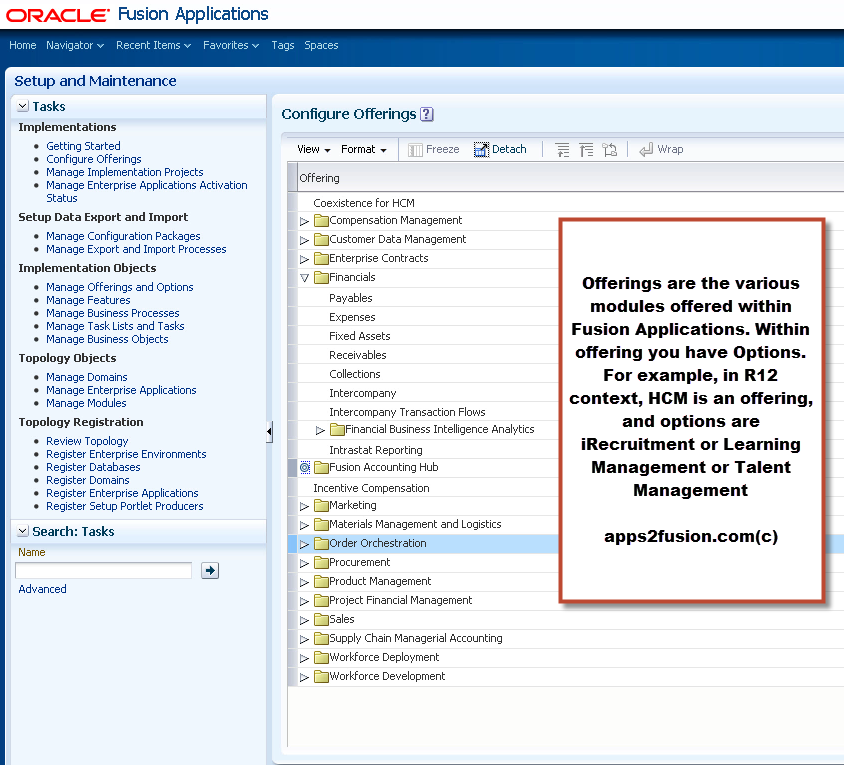
In EBS, General Ledger, Payables, iExpenses were modules. However in Fusion Applications, the parent module is Financials. This parent module is called the offering.  Therefore Financials is the offering, HCM is the offering. Within this offering you have Options. For example, within Financial offering you can implement Payables or Receivables or iExpenses or all the above. Now within the options, you have features. For example, iExpense has a feature of importing expenses straight from excel. Another feature within iExpense is to implement corporate credit card integration.

To make the job of doing implementation easy, Fusion Financials generates a task list on the basis of combination of Offering, Option and feature that you have selected during the implementation.

These initial screenshots will give you a flavour of Fusion Applications.

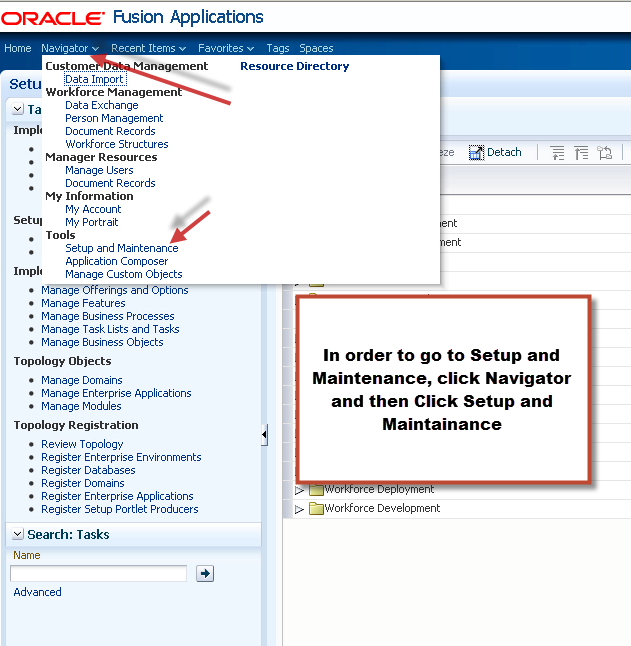
When you login to Fusion Applications, you will see a Navigator link.


When you click on Setup and Maintenance, you can then search for any page/screen. This is called Task, inherently due to ADF application UI being called Task [bounded/unbounded].


As shown below, various offerings in Fusion Applications are listed below.


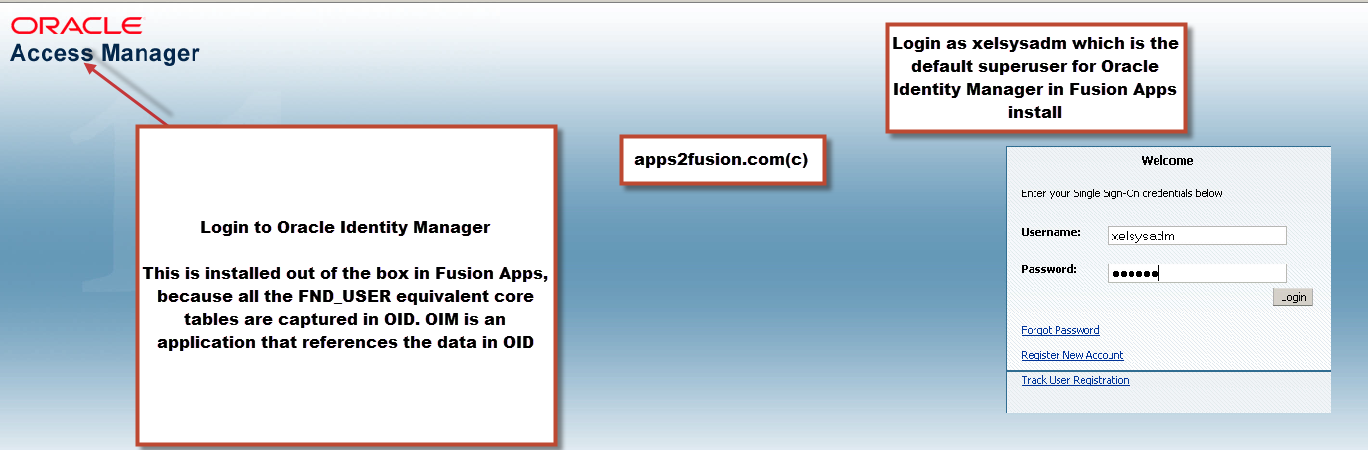
To define users and their roles, you need to use Oracle Identity Manager that comes in built within the Fusion Applications.


When you log into Oracle identity manager, lets say using the default login of xelsysadm, then you can either view your own roles[self service] or you can administer other users.

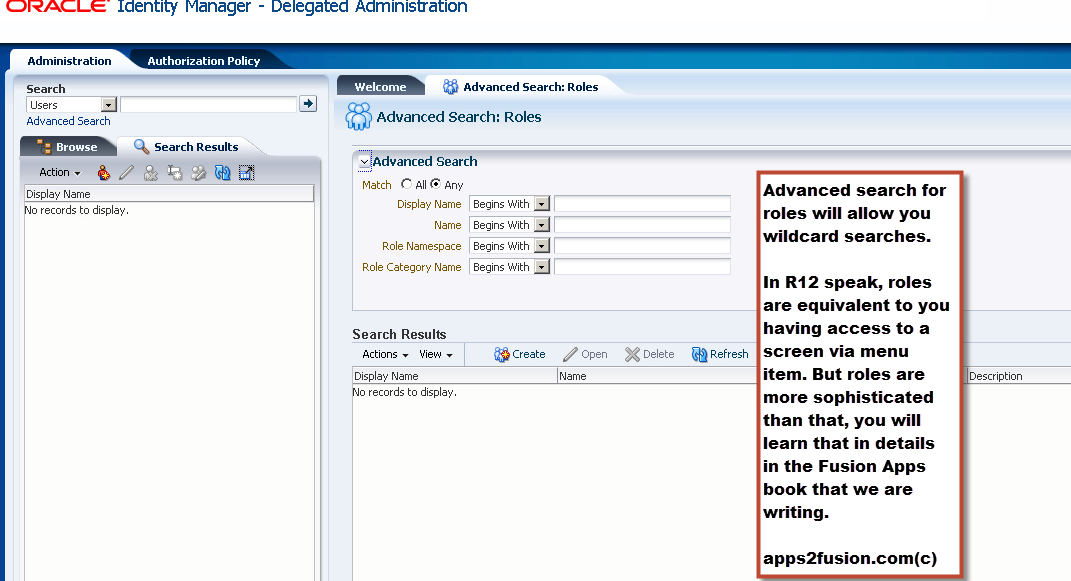
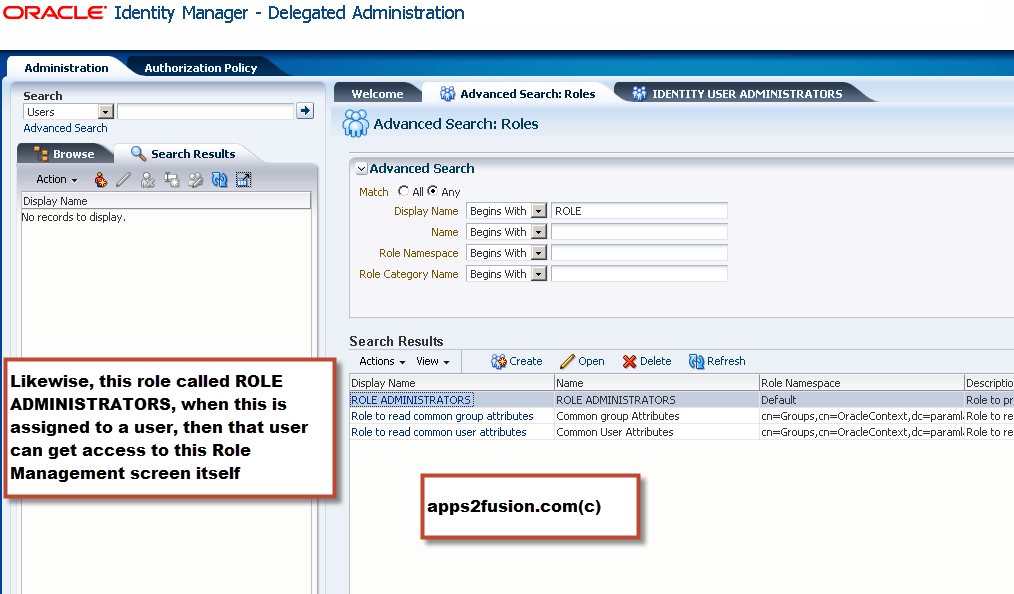
In the screenshot below, click on Administration link and that will present you with the screen to create users or roles.


Here you can create users or roles.
However please note that a role gets registered in OID as a Group, whereas a user created from here will get registered in OID as a User. OID is the Oracle Internet Directory that can either be used standalone in which case usernames and passwords will be stored in OID, or OID can be synch’ed up with AD, and kept a slave of AD, in which case the passwords will be stored in AD. Many organizations already have active directory for authentication in their enterprise.


You can also perform wildcard searches for usernames and roles.


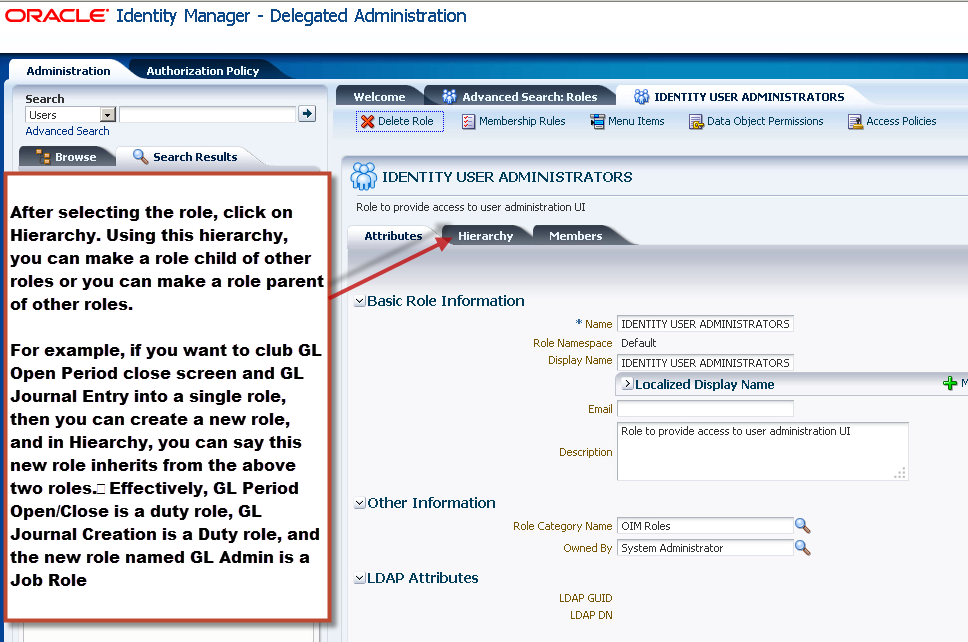
One role can inherit properties from another Fusion Applications role, this is explained in the screenshot below.


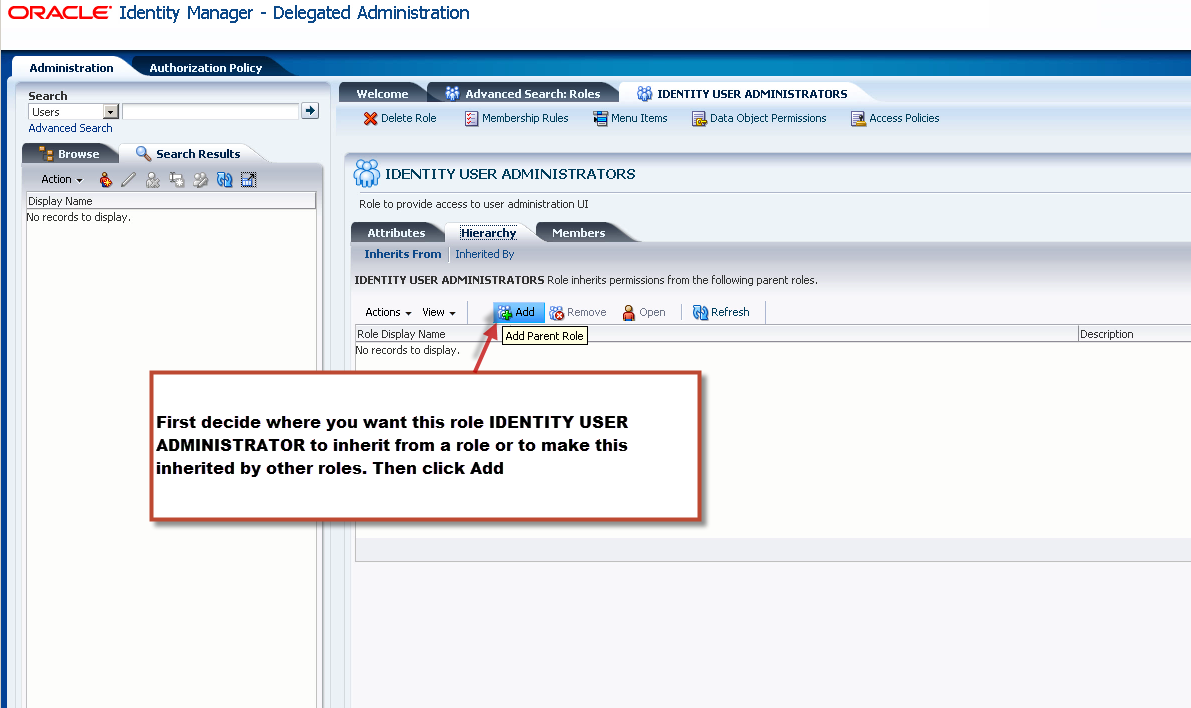
The screenshot below shows how you can make one role inherit properties from another role.


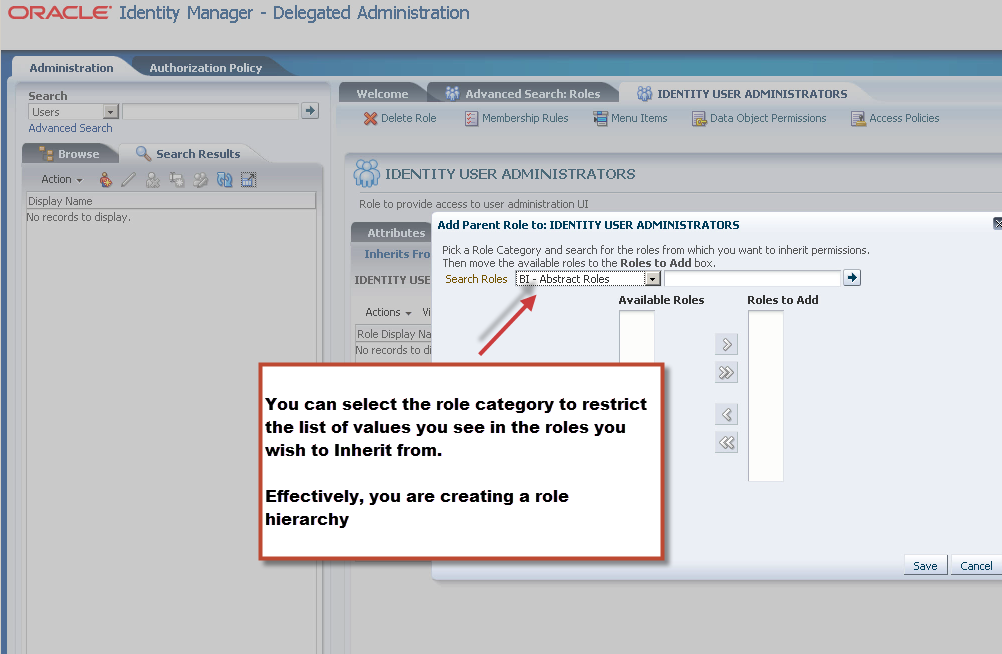
Select the roles you wish to add


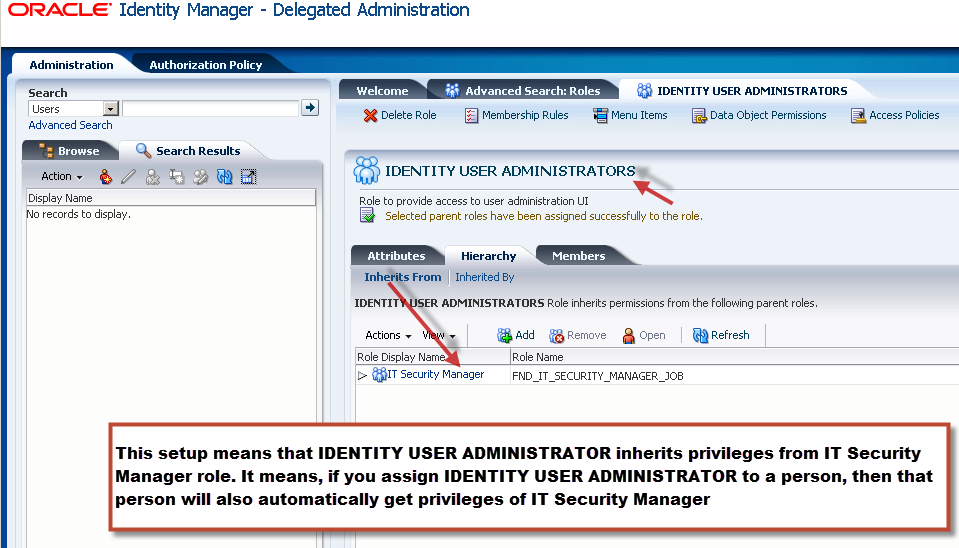
As shown below, we have created a hierarchy of roles


In order for a role to become available to an impementation user, that role must be assigned to the Xellerate Organization. This is a dummy organization to which all the administrative users belong to.


As you can see, we are granting various permissions on role FND_IT_SECURITY_JOB to Xellerate organisation.